- Tensor(テンソル)
- Operation(演算)
- Variable(変数)
- Session(セッション)
- Placeholder(プレースフォルダ)
TensorFlow(テンソルフロー)の基本的な考え方
TensorFlowを使って、「counterの変数を、step_sizeの数だけ加算した内容に変更する処理を5回行わせます」。counter=counter+step_sizeの処理を5回です。
step_sizeの初期値が1なので、変数は0から1,2,3,4,5と変化します。
次にその処理をもう一回行わせています。
なお、最初の処理で「g2=counter+step_size」も行わせて実験をしています。
# coding: UTF-8
#

import tensorflow as tf

step_size=tf.constant(1, name="step_size") # 初期値が1の固定値が入るTensorを作った。
print(step_size.__class__) #表示:<class 'tensorflow.python.framework.ops.Tensor'>
print(step_size)#表示:Tensor("step_size_1:0", shape=(), dtype=int32)

counter=tf.Variable(0,name="counter") # 初期値ゼロの変数を作った。
print(counter.__class__) #表示:<class 'tensorflow.python.ops.variables.Variable'>
print(counter)#表示:<tf.Variable 'counter:0' shape=() dtype=int32_ref>

increment_op=tf.add(counter,step_size, name="add") # 上記変数と定数を加算する処理のTensorを作った
print(increment_op.__class__)#表示:<class 'tensorflow.python.framework.ops.Tensor'>
print(increment_op)#表示:Tensor("add1_1:0", shape=(), dtype=int32)

count_up_op=tf.assign(counter, increment_op) # 演算結果を変数に格納する処理
print(count_up_op.__class__)#表示:<class 'tensorflow.python.framework.ops.Tensor'>
print(count_up_op)#Tensor("Assign_1:0", shape=(), dtype=int32_ref)

g2=counter+step_size
print(g2) # Tensor("add_1:0", shape=(), dtype=int32)
'''
以上までの処理は、「Computational Graph(:計算グラフ)の構築です。
各変数は、処理順序などの計画書と言えます。
よって、計画書を表示しただけで、(Tensorのオブジェクトが表示されるだけで、)
                      計算した結果が得られるものではありません。
実際に、計算などの処理を行わせるには、「Session」のrunメソッドを実行させる必要があります。
セッションが違えば、同じ計算グラフでも別環境で実行していることになります。
つまり、セッションは実行単位のようなものと言えます。
'''
print("---最初のセッションの実行---")
with tf.Session() as sess: # セッション
   sess.run(tf.global_variables_initializer())
   for n in range(5):
      v = sess.run(count_up_op)# 計算して結果を得る
      print(v)
      print(g2) # Tensor("add_1:0", shape=(), dtype=int32)の表示で計算しない。
      print(sess.run( g2 )) # 計算して結果を表示
      print("----")

print("---次のセッションの実行---")
with tf.Session() as sess: # セッション
   sess.run(tf.global_variables_initializer())
   for n in range(5):
      print(sess.run(count_up_op))

# import write_graph
上記のセッションの実行の箇所の実行結果を示します。
---最初のセッションの実行---
1
Tensor("add_1:0", shape=(), dtype=int32)
2
----
2
Tensor("add_1:0", shape=(), dtype=int32)
3
----
3
Tensor("add_1:0", shape=(), dtype=int32)
4
----
4
Tensor("add_1:0", shape=(), dtype=int32)
5
----
5
Tensor("add_1:0", shape=(), dtype=int32)
6
----
---次のセッションの実行---
1
2
3
4
5
上記で、最初セッションと次のセッション表示で、それぞれは異なる環境で実行している。さて、最後の「import write_graph」のコメントを外すと、「write_graph.py」を実行されて次の内容が表示される。
(このファイル write_graph.py は、独自に作成した確認用です。)
[D:\tensortest/logstest]に,情報が生成されます。
1
実行後、tensorboard --logdir=logstest
これは、tensorboardコマンド用に、「./logste」フォルダを生成して情報を記録したことを意味しています。
このフォルダと同じ位置で、次のようなコマンドコマンド操作でwebサーバを起動して情報を発信させます。
D:\tensortest>tensorboard --logdir=logstest
Starting TensorBoard b'54' at http://mymachine:6006
(Press CTRL+C to quit)
上記のメッセージを得られた場合、Webブラウザ(最新の)で、「http://mymachine:6006/#graphs」に接続すると 次のような「Computational Graph(:計算グラフ)」のイメージが得られます。
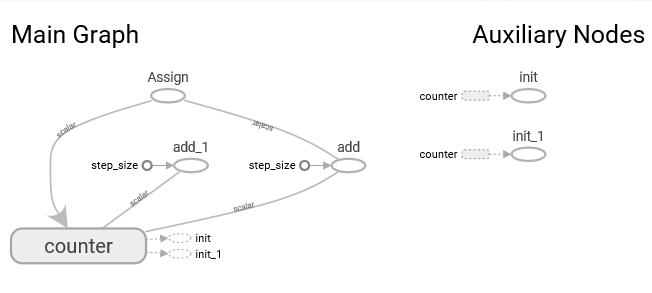
このグラフの左側がセッションで行った計算の構造です。
counterをaddでstep_sizeで算出した結果を、Assignでcounterに設定しています。
これが、外側のループを作っています。
なお、内側のループにあるaad_1は「g2=counter+step_size」処理です。
右側で結果としてAuxiliary(補助)Nodesがあり、int と int_1がcounter から得られています。
intは、最初のセッションで得られる結果で、int_1は次のセッションで得られた結果です。
TensorFlowで複数でデータで一遍に行わせる
前述の例では、TensorFlowたる配列を入力にしなかったので、配列処理の例に変更します。counterの変数を3×2の2次配列で、異なる初期値を設定し、増加用定数のstep_sizeも同じ次数だけ用意します。
TensorFlowでは次数を「ランク」と呼びますが、演算対象のランクや要素は同じでないとエラーが起きます。
なお、.__class__のクラス確認は前述例と同じ結果なので、無くしています。
また、「g2=counter+step_size」が可能なことを確認したので、無くしています。
また、with を使うべき所を、あえて使わなない記法で例を示します。
# coding: UTF-8
#
import tensorflow as tf

step_size=tf.constant([[1,2,3],[1,2,3]], name="step_size") # 初期値を配列の固定値が入るTensorへ。
print(step_size)#表示:Tensor("step_size:0", shape=(2, 3), dtype=int32)

counter=tf.Variable([[0,100,200],[300,400,500]],name="counter") # 初期値指定の配列の変数を作った。
print(counter)#表示:<tf.Variable 'counter:0' shape=(2, 3) dtype=int32_ref>

increment_op=tf.add(counter,step_size, name="add") # 上記変数と定数を加算する処理のTensorを作った
print(increment_op)#表示:Tensor("add:0", shape=(2, 3), dtype=int32)

count_up_op=tf.assign(counter, increment_op) # 演算結果を変数に格納する処理
print(count_up_op)#Tensor("Assign:0", shape=(2, 3), dtype=int32_ref)

print("---セッションの実行---")
sess =  tf.Session()# セッション

sess.run(tf.global_variables_initializer())
for n in range(5):
      v = sess.run(count_up_op)# 計算して結果を得る
      print(v)

sess.close()

import write_graph
セッションでの実行結果を下記に示します。
[[  1 102 203]
 [301 402 503]]
[[  2 104 206]
 [302 404 506]]
[[  3 106 209]
 [303 406 509]]
[[  4 108 212]
 [304 408 512]]
[[  5 110 215]
 [305 410 515]]
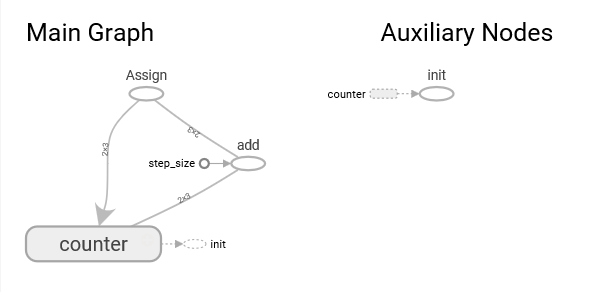
この計算グラフを以下に示します。
プレースホルダ (place holder)
正式な値が入るまで一時的に場所を確保しておくためのものが「プレースホルダ」です。他のクラスと比較します。定数は実行する前で初期値を与えて使います。
変数は、tf.assignで代入する指定により、実行時に変更する表現が可能です。
そして、変数に値が代入されるタイミングは、runに指定したオペレーションがすべて完了した後です。
さて、 プレースホルダー(placeholder)はデータは未定のままグラフを構築し、 具体的な値は実行するときに与えます。
変数のように、tf.assignで指定するのではなく、定数のように実行前に決めてお置くものでもなく セッション実行時に情報を与えるために使います。
具体的には、実行時にfeed_dictの引数を介してディクショナリ「{ 変数:値 } の表現です」で与えます。
# coding: UTF-8
import tensorflow as tf

x = tf.placeholder(tf.int32, name='x')
y = tf.placeholder(tf.int32, name='y')
z = tf.placeholder(tf.int32, name='z')

print(x.__class__) #表示:<class 'tensorflow.python.framework.ops.Tensor'>
print(x)#表示:Tensor("x:0", dtype=int32)

param_xy = { x:[1,2,3], y:[2,3,4] } # placeholderに設定するデータ

mult_op = tf.multiply( x, y , name='multXY')

with tf.Session() as sess:
    v = sess.run( mult_op , feed_dict=param_xy )
    print( v )
    print( sess.run( v + z , feed_dict = { z: [1,1,1] } ) )

import write_graph
上記では、x,y,z のプレースホルダを用意し、実行時に値を与えて、x × y の結果をvに記憶し、
それを表示してから、v と z の加算を表示させています。
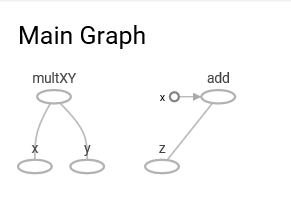
このセッションの実行で得られる表示結果を下記に示す。[ 2 6 12] <class 'numpy.ndarray'> [ 3 7 13]この計算グラフを以下に示します。
なお、プレースホルダーに値を与えずに関連したオペレーションを実行すると、 必要なデータがないためエラーになります。
そこで、あらかじめ初期値を指定する必要がある場合は、tf.placeholder_with_defaultを使います。
この使用例と、上記の処理を一括で行う式の構築例を示します。
# coding: UTF-8
#	 [placeholder.py]

import tensorflow as tf

x = tf.placeholder(tf.int32, name='x')
y = tf.placeholder(tf.int32, name='y')
#z = tf.placeholder(tf.int32, name='z')
z = tf.placeholder_with_default( tf.zeros([3], tf.int32), shape=[3], name='z' )

param = { x:[1,2,3], y:[2,3,4] ,z:[1,1,1]} # placeholderに設定するデータ
# param = { x:[1,2,3], y:[2,3,4] } # placeholderに設定するデータ

mult_op = tf.multiply( x, y , name='multXY')
add_op = tf.multiply( mult_op, z, name='add_z')

with tf.Session() as sess:
    v = sess.run( add_op , feed_dict=param )

print( v )
import write_graph
この実行結果です。
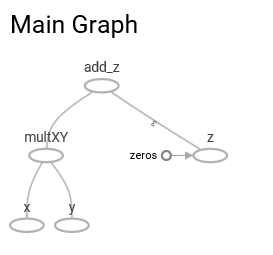
[ 2 6 12]この計算グラフを以下に示します。
上記で、addとmultiplyの例を示しました。他の算術関数を示します。
tf.subtract
tf.divide
tf.floordiv
tf.mod
tf.pow