(作成に当たって、書籍:ゼロから作るDeep Learning(978-4-87311-758-4)のコードを参考にしました。)
なお、バッチ学習には対応していません。
バッチ学習で適切なライブラリを使うと高速でメモリ効率向上を期待できるらしいのですが、 一般的なライブラリを使わずに全部自作なので、単純にできることを重視しました。
以下が実行画面のイメージで、①から④のボタン操作で素材の取得から学習、予測まで簡単に確認できます。
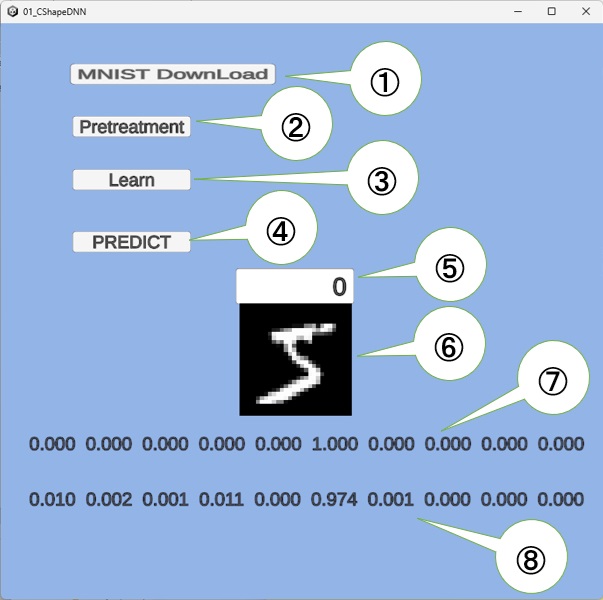 次のように操作できます。
- ①ボタンの操作
MNISTの画像学習素材(train-images-idx3-ubyte.gz、train-labels-idx1-ubyte.gz)を、ダウンロードします。
(一度、実行して素材を入手すれば、再び実行する必要はありません。) - ②ボタンの操作
train-images-idx3-ubyte.gz、train-labels-idx1-ubyte.gzから、ここで使うネットワークの学習の入力で使う前処理を行います。
具体的には、上記学習素材から前処理してシリアライズしてファイル化(x_train.bin、t_train_a.bin)します。
(一度、実行してファイルが作られれば再び実行する必要はありません。)
この実行後は、⑤に画像を選択する添え字を入力すると、その画像が⑥に表示されて⑦に正解のワンホットの表現が表示されます。
- ③ボタンの操作
前処理したファイル(x_train.bin、t_train_a.bin)を読み取って、このファイル先頭から(train_size = 500個)から 「ランダムで一つ抽出して学習する」ことを1000回行います。
この一回の実行で、TwoLayerNetの学習パラメタ(naW1、naB1、naW2、naB2)が更新されます。
この学習過程で、⑧の箇所に例えば「count: 999, cross entropy loss: 0.657845」のような表示を行います。
これは学習回数と、交差エントロピー誤差(正解と予測と誤差を表現する値で、0に近いほど学習できている意味の値)の表示です。
この実行後は、⑤に入力した選択画像に対して、予測値が⑧の箇所に表示されます。
まだ学習が足りない場合、この③ボタンの操作は何回行っても構いません。
この③ボタン実行後でプログラムを終了する時、学習したデータ(naW1、naB1、naW2、naB2)をweight_bias_params_0.binに保存します。
(この学習済みデータをマイコン内に埋め込み、判定器の部分だけ実装すれば、AI制御が可能になります。)
- ④ボタンの操作
プログラムの起動直後に、このボタンを操作する場合だけ、weight_bias_params_0.binファイルの学習済みデータをロードします。
それを使って、⑤に入力した選択画像に対して、予測値が⑧の箇所に表示されます。
(起動直後で、先に③ボタンの操作を行うと、学習済みデータは消えて、最初からの学習になります)
Unityプロジェクトとソース(パッケージ)
以下のように作りました。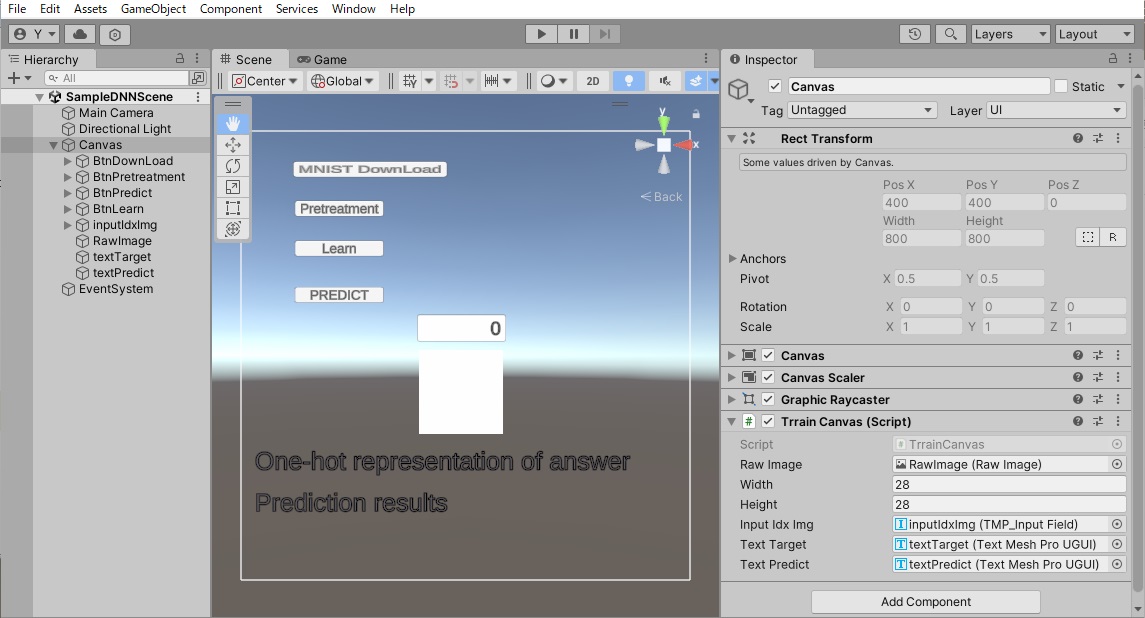
このプロジェクトを実現しているソースコードは、Canvasにアタッチする後述の TrrainCanvas.cs と、下記のライブラリ的な2つのファイルで出来ています。 TrrainCanvas.csのコードを以下に示します。
MNISTから6万個の画像を入手していますが、その中で下記では先頭から(train_size = 500)個だけで学習しています。
よって、⑤の添え字入力で500~59999の入力範囲は、学習に使われなかった画像の予測判定になります。
ある程度正解しうる予測値にするためには、Learnボタンで,5000回以上の学習が必要でしょう。
using System.Collections;
using System.Collections.Generic;
using UnityEngine;
using System;
using System.Net;
using System.IO.Compression;
using System.IO;
using UnityEngine.UI;// RawImag用
using TMPro;

public class TrrainCanvas : MonoBehaviour
{
    [SerializeField] RawImage rawImage; // 検証画像の表示用■■■■■
    public int width = 28;
    public int height = 28;
    private Texture2D texture;// 上記rawImage用テクスチャ
    private Color32[] pixels;  // 上記textureの更新用

    NumArray x_train = null; // [1,60000,28*28]の手書き画像
    NumArray t_train = null; // One-Hot ベクトル表現で、学習目標

    [SerializeField] TMP_InputField inputIdxImg;//using TMPro;■■■■■
    private int idxImg = 0;// 上記描画画面を指定する添え字
    private int idxImgPrev = -1;// 上記描画画面を指定する添え字


    [SerializeField] TextMeshProUGUI textTarget;//using TMPro ■■■■■
    [SerializeField] TextMeshProUGUI textPredict;//using TMPro ■■■■■

    string x_train_file = "x_train.bin";// 学習や検証素材を、前処理してシリアラスした画像ファイル(28*28の6万個)
    string t_train_file = "t_train_a.bin";// 上記の正解ファイルで、One-Hot ベクトル表現に前処理してファイル

    TwoLayerNet twoLayerNet = null;
    static Color32[] defualtPixels = null;

    int train_size = 500;//  60000 個画像の先頭から、何個までを訓練用に使うかのサイズ
    int iters_num = 0; // 勾配法の算出繰り返しの回数指定変数(Learnボタンで設定)
    int iters_cnt = 0;//上記の学習カウント(iters_num>iters_cnt以外が学習中)
    float train_next_time=0;

    static Color32[] GetDefualPixels(int width, int height)// RawImageに初期描画する模様生成
    {
        // 画素配列を初期化
        Color32[] pixels = new Color32[width * height];
        for (int y = 0; y < height; y++)
        {
            for (int x = 0; x < width; x++)
            {
                if ((x + y) % 2 == 0)
                {
                    pixels[y * width + x] = new Color32(255, 255, 255, 255);// Color.white;
                }
                else
                {
                    pixels[y * width + x] = Color.black;// 市松模様
                }
            }
        }
        return pixels;
    }
    void Start()
    {
        UnityEngine.Random.InitState(123);//乱数シード指定(完成後にコメント化の予定)

        // テクスチャを生成
        texture = new Texture2D(width, height, TextureFormat.RGBA32, false);
        texture.filterMode = FilterMode.Point; // ドット絵のように表示する場合
        rawImage.texture = texture;

        defualtPixels = GetDefualPixels(width , height);// 画素配列を初期化
    }

    void FixedUpdate()
    {
        if (this.Learning())//  学習中
        {
            return;
        }
        string strInputIdx = this.inputIdxImg.text;// 6万個の画像のオペレータの入力位置
        try
        {
            this.idxImg = int.Parse(strInputIdx);// 入力文字列から添え字取得
            this.textTarget.text = "One-hot representation of answer";// 正解表示部の初期表
            if (this.x_train != null)// 入力添え字の画像と正解のワンホットの表現の文字列表示
            {
                this.pixels = x_train.getPixels(width, height, idxImg);// 位置から画像を取得
                this.textTarget.text = t_train.getOneOfKstring(idxImg);
            } else
            {
                this.pixels = defualtPixels;// 画素配列を初期化
            }

            if( this.twoLayerNet != null)// // 入力添え字の画像の予測判定結果表示
            {
                if (this.idxImg == this.idxImgPrev) return;
                this.idxImgPrev = this.idxImg;

                NumArray naX = this.x_train.createLineAt(idxImg);

                NumArray naY = twoLayerNet.predict(naX);
                Debug.Log($"naY.shape:{naY.shapeR}");
                naY.shapeR[1] = 1;
                this.textPredict.text = $"{naY.getOneOfKstring(0)}";// ワンホット表現の文字列取得

            } else
            {
                this.textPredict.text = "Prediction results"; // 予測確率分布表示部の初期表
            }
        }
        catch (Exception e) {
            this.pixels = defualtPixels;// 画素配列を初期化
            Debug.Log(e);
        }

        texture.SetPixels32(pixels);// テクスチャに画素群(pixels)を設定して適用
        texture.Apply();
    }

    public static void MNIST_downloader()
    {
        string url = "https://storage.googleapis.com/cvdf-datasets/mnist/"; // MNIST データベース の URL

        System.Diagnostics.Stopwatch sw = new System.Diagnostics.Stopwatch(); // ダウインロード時間確認用
        sw.Start();
        Debug.Log("START: " + sw.Elapsed.TotalSeconds + " seconds");

        string[] download_files = { "train-images-idx3-ubyte.gz", "train-labels-idx1-ubyte.gz" };

        foreach (string file in download_files)
        {
            string download_url = url + file;
            using (WebClient client = new WebClient())
            {
                client.DownloadFile(download_url, file);
                Debug.Log(download_url + "をダウインロードしました");
            }
        }
        sw.Stop();
        Debug.Log("END: " + sw.Elapsed.TotalSeconds + " seconds");
        Debug.Log("ダウンロード時間: " + sw.Elapsed.TotalSeconds + " seconds");
    }

    // 学習素材の前処理を行って、x_train_fileとt_train_fileファイルを生成し、
    // this.x_trainと、 this.t_trainを設定
    public void Pretreatment() // ダウンロードファイルの前処理
    {
        try
        {
            mk_x_train_bin();//手書き画像6万件の前処理
            mk_t_train_bin();//手書き画像6万件の答えをOne-Hot ベクトル表現へ前処理
        }
        catch (Exception e)
        {
            Debug.Log($"エラー: {e.Message}");
        }

    }

    void mk_x_train_bin()//手書き画像6万件の前処理
    {
        string filePath = "train-images-idx3-ubyte.gz"; // ファイルパス
        int imageWidth = 28;
        int imageHeight = 28;
        int imageCount = 60000;// この数の画像

        byte[] imagesBytes = null;// train-images-idx3-ubyte.gzの画像部のbyte列記憶域
        try
        {
            using (FileStream fileStream = new FileStream(filePath, FileMode.Open))
            using (GZipStream gzipStream = new GZipStream(fileStream, CompressionMode.Decompress))
            using (BinaryReader reader = new BinaryReader(gzipStream))
            {
                reader.ReadBytes(16);// メタデータを読み飛ばす (16 バイト)

                // 画像データを読み込む
                imagesBytes = reader.ReadBytes(imageWidth * imageHeight * imageCount);
            }
        }
        catch (Exception ex)
        {
            Debug.Log($"エラー: {ex.Message}");
        }

        // イメージデータを前処理して記憶
        this.x_train = NumArray.createByBytes(imagesBytes, 28 * 28);
        this.x_train.mul_scalar(1.0f / 255f);// 画像データ0~255を、0~1.0に正規化
        using (FileStream fileStream = new FileStream(x_train_file, FileMode.Create))
        {
            this.x_train.write(fileStream);//"x_train.bin"に前処理した画像(28*28の6万個)データをシリアライズ
        }
    }

    void mk_t_train_bin()//手書き画像6万件の答えをOne-Hot ベクトル表現へ前処理
    {
        string filePath = "train-labels-idx1-ubyte.gz"; // ファイルパス
        int imageCount = 60000;// この数の画像

        byte[] buf = null;// train-images-idx3-ubyte.gzの画像部のbyte列記憶域
        try
        {
            using (FileStream fileStream = new FileStream(filePath, FileMode.Open))
            using (GZipStream gzipStream = new GZipStream(fileStream, CompressionMode.Decompress))
            using (BinaryReader reader = new BinaryReader(gzipStream))
            {
                reader.ReadBytes(8);// メタデータを読み飛ばす (8 バイト)
                buf = reader.ReadBytes(imageCount);// 画像の正解データを読み込む
            }
        }
        catch (Exception ex)
        {
            Debug.Log($"エラー: {ex.Message}");
        }

        // イメージデータを前処理して記憶
        this.t_train = NumArray.create(10, buf.Length);//One-Hot ベクトル表現
        for (int i = 0; i < buf.Length; i++)
        {
            this.t_train.FPAt(buf[i], i, 0) = 1.0f;
            //Debug.Log(this.t_train.getOneOfKstring(i));
        }
        using (FileStream fileStream = new FileStream(t_train_file, FileMode.Create))
        {
            this.t_train.write(fileStream);
        }
    }

    public void predict()
    {
        // 予測実行
        try
        {
            if (this.x_train == null)
            {
                this.x_train = new NumArray();
                using (FileStream fileStream = new FileStream(x_train_file, FileMode.Open))
                {
                    this.x_train.read(fileStream);
                }

                this.t_train = new NumArray();
                using (FileStream fileStream = new FileStream(t_train_file, FileMode.Open))
                {
                    this.t_train.read(fileStream);
                }
            }
            // 学習済みデータの読み込み
            if(this.twoLayerNet  == null) this.twoLayerNet = new TwoLayerNet("weight_bias_params_0.bin");
        }
        catch(Exception e)
        {
            this.textPredict.text = e.ToString();
        }
    }

    // 学習スタート実行(-W1,B1,  W2,B2 の重みバイアスを正解に近づける一回の計算)
    public void Learn()
    {
        if (this.iters_cnt < this.iters_num) return;// 既に学習中

        if (this.x_train == null)
        {
            this.x_train = new NumArray();
            using (FileStream fileStream = new FileStream(x_train_file, FileMode.Open))
            {
                this.x_train.read(fileStream);
            }

            this.t_train = new NumArray();
            using (FileStream fileStream = new FileStream(t_train_file, FileMode.Open))
            {
                this.t_train.read(fileStream);
            }
        }

        iters_num += 1000; // この数の学習を指示

        if(this.twoLayerNet == null)
        {
            this.twoLayerNet = new TwoLayerNet(28 * 28, 50, 10, 0.01f);
            //this.twoLayerNet = new TwoLayerNet("weight_bias_params_0.bin");
            this.iters_cnt = 0;
        }
    }

    bool Learning()// 学習の実行中(次のFixupdateタイミング近くまで、勾配降下法で解に近づける)
    {
        if (this.twoLayerNet == null) return false;
        if (this.iters_cnt == this.iters_num) return false;
        if (this.iters_cnt > this.iters_num)
        {
            this.iters_cnt = this.iters_num;// 学習の終了
            return false;
        }

        for ( ; ; )
        {
            if (this.iters_cnt >= iters_num) return false;// Learnボタンによる所定回数の学習が終わった。
            this.iters_cnt++;

            int idx = NumArray.random.Next(0, train_size);// 学習対象の画像取得

            NumArray x_batch = this.x_train.createLineAt(idx);
            x_batch.shapeR[1] = 1;
            NumArray t_batch = this.t_train.createLineAt(idx);
            t_batch.shapeR[1] = 1;
            //Debug.Log($"x_batch:{x_batch}");
            //Debug.Log($"t_batch:{t_batch}");

            this.twoLayerNet.gradient_and_set_W2_B2_W1_B1(x_batch, t_batch);// twoLayerNet内の gradsW2,B2,W1,B1の傾き設定

            if (this.train_next_time < Time.time) break;
        }
        string msg = $"count:{iters_cnt,7}, cross entropy loss:{this.twoLayerNet.loss,10:F6} ";
        Debug.Log(msg);
        this.textPredict.text = msg;
        this.train_next_time = Time.time + Time.fixedDeltaTime * 0.9f;
        return true;
    }

    private void OnApplicationQuit()
    {
        this.twoLayerNet.save_params("weight_bias_params_0.bin");// 学習パラメタの保存
    }
}